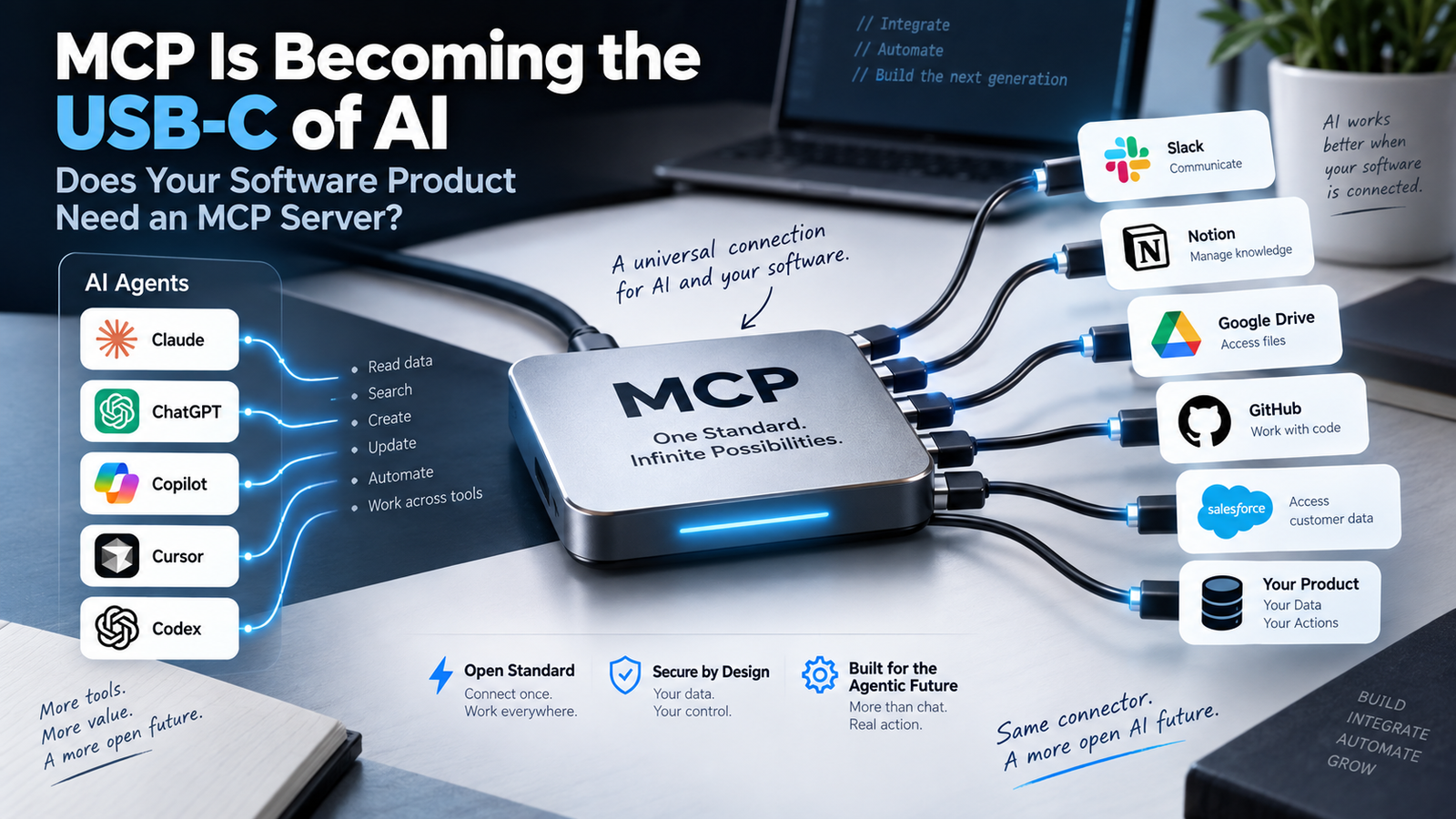
You already have APIs. Your product may already integrate with CRMs, payment systems, analytics tools, support platforms and internal databases. So why is the software industry suddenly talking about MCP servers?
Because AI agents are changing the integration problem. Instead of only connecting one application to another, businesses increasingly want AI assistants and agents to discover tools, understand available actions and interact with software in a standardized way.
Quick answer: Model Context Protocol (MCP) is an open standard for connecting AI applications to external tools and data. It does not replace every API. Instead, it can provide a common agent-facing layer that makes existing capabilities easier for AI systems to discover and use.
If customers may eventually want ChatGPT, Claude, coding agents or enterprise AI systems to interact with your product, an MCP server may become strategically useful—but only when the use case, permissions and security model justify it.
Why MCP Is Suddenly Everywhere
MCP was introduced by Anthropic in late 2024 as an open standard for connecting AI assistants to external systems. By December 2025, Anthropic donated MCP to the Agentic AI Foundation under the Linux Foundation, alongside support from organizations including OpenAI, Google, Microsoft, AWS, Cloudflare and Bloomberg.
Anthropic also reported more than 10,000 active public MCP servers at that time, with adoption across products including ChatGPT, Cursor, Gemini, Microsoft Copilot and Visual Studio Code.
Primary-source background on MCP governance, ecosystem support and cross-platform adoption.
The protocol has continued evolving quickly. The July 28, 2026 specification introduced a stateless protocol core, header-based routing, cacheable tool lists, authorization hardening and a formal extensions framework.
Source for current MCP scale, the stateless core and newer enterprise features.
What Exactly Is MCP?
Model Context Protocol defines a standard way for an AI application to connect to an external system that exposes useful capabilities. In simple terms, an MCP server can tell an AI client what it can access and what actions it can perform.
That might include reading data, searching documents, creating a ticket, querying a database, updating a record, checking an order status or triggering a business workflow.
The key idea is not that MCP replaces your backend. Your API, database and business logic still do the real work. MCP becomes an agent-friendly interface around those capabilities.
The original MCP announcement explains the client-server model and the goal of reducing fragmented one-off integrations.
MCP vs API: Is MCP Replacing APIs?
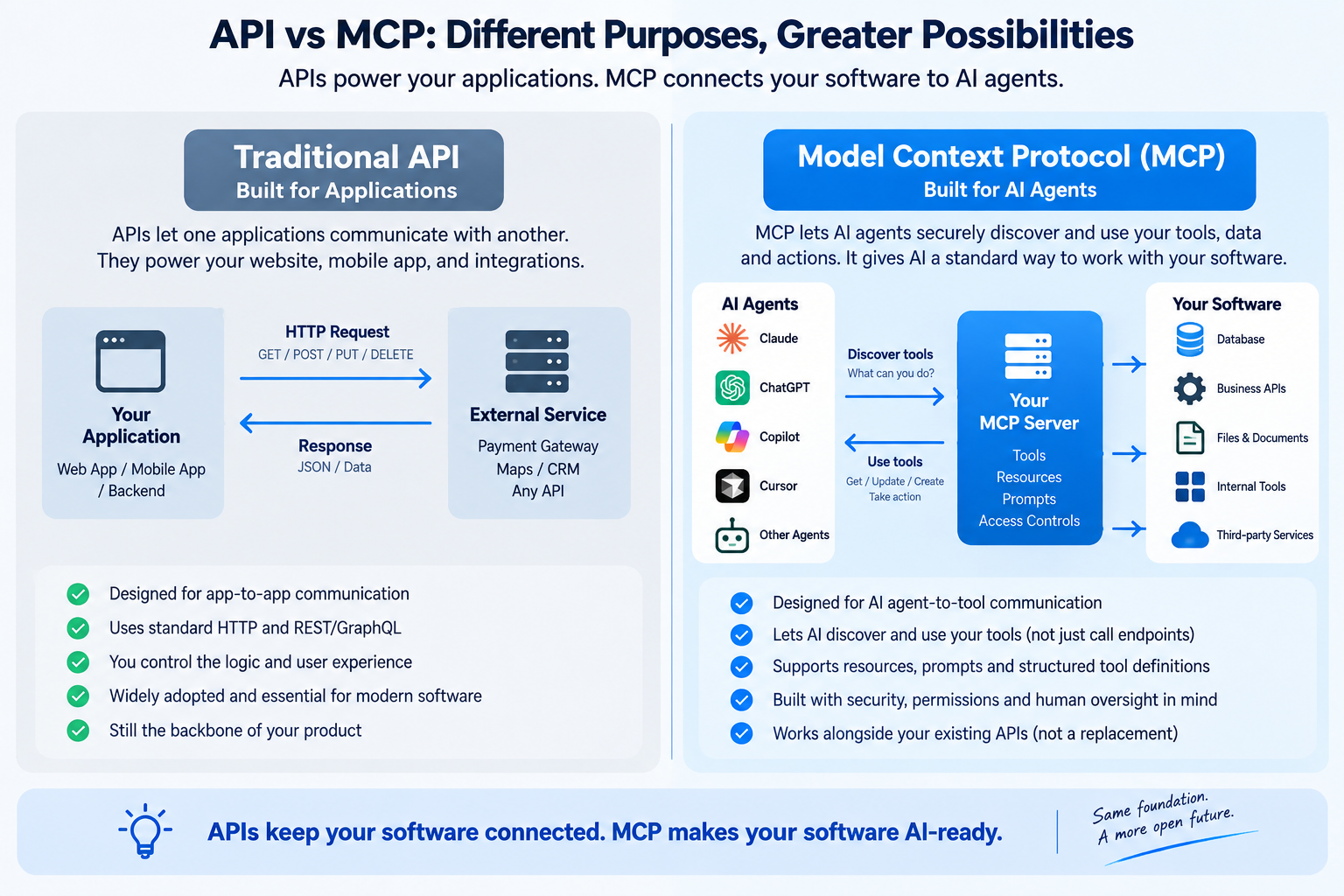
No. This is one of the most important misconceptions to avoid.
| Traditional API | MCP |
|---|---|
| General application-to-application interface | Standardized interface designed for AI clients and agents |
| Developer usually reads documentation and builds integration logic | AI client can discover exposed tools and capabilities |
| Can be REST, GraphQL, gRPC or another architecture | Protocol layer can sit on top of existing services |
| Used by mobile apps, websites, integrations and backend systems | Primarily useful when AI systems need to interact with your product |
| Business API can remain your source of truth | MCP can translate selected capabilities into agent-usable tools |
Best mental model: An API is often your product's core integration surface. MCP can become an AI-facing adapter that exposes the right parts of that API in a form agents understand consistently.
Why People Compare MCP to USB-C
The USB-C analogy is useful because the pain MCP tries to solve is similar: too many custom connections.
Without a common protocol, every AI application may need its own custom integration for every external tool. That creates a matrix of integrations that becomes expensive to build and maintain.
Without MCP
AI App A needs a custom connector. AI App B needs another. AI App C needs another. Your product team maintains each integration separately.
With MCP
Your product exposes selected capabilities through an MCP server, and compatible AI clients can integrate through the same protocol.
The analogy is not perfect—MCP is a software protocol, not a physical connector—but it explains why developers are interested in a shared standard.
What Can an MCP Server Expose?
Business Data
Customer records, orders, invoices, inventory, reports or account information.
Search & Retrieval
Documents, knowledge bases, product catalogs, support history or internal policies.
Actions
Create tickets, send messages, update records, generate reports or trigger workflows.
Developer Tools
Repositories, issues, pull requests, logs, errors, databases and deployment systems.
Operational Tools
CRM actions, scheduling, incident management and back-office workflows.
Interactive Experiences
Newer MCP extensions can support richer interactive UI and long-running tasks.
Why the 2026 MCP Specification Matters for Production Software
Earlier MCP deployments could require stateful sessions and more infrastructure coordination. The 2026-07-28 specification changed the core transport model to stateless request/response interactions.
The practical benefit is that MCP servers can fit more naturally into conventional web infrastructure such as load balancers, serverless deployments and edge platforms. The specification also added clearer routing metadata, caching support and authorization hardening.
Official overview of the stateless core, routing, cacheable lists, authorization changes and extensions.
Does Every SaaS Product Need an MCP Server?
No. Building an MCP server because the technology is trending is not a strategy.
An MCP integration becomes more compelling when AI agents could create genuine user value by interacting with your product.
Strong MCP Candidate
Your users repeatedly move data between your product and AI assistants, or they want agents to perform common workflows inside your product.
Weak MCP Candidate
Your application has no realistic agent workflow, exposes highly sensitive operations, or its capabilities are already adequately served by existing integrations.
Good signals that you may need MCP
- Customers already copy data from your product into ChatGPT or Claude.
- Your users want AI to search or summarize product data.
- Your software has repetitive actions agents could safely execute.
- You already have a mature API and permission model.
- Your competitors are beginning to expose agent integrations.
- Your enterprise customers are asking about AI-agent compatibility.
Real Developer Usage Is Moving Beyond Demo Projects
Community discussions show developers using MCP for code repositories, issue tracking, databases, error monitoring and productivity workflows. That does not prove every server is production-ready, but it shows where practical usage is emerging.
“Installed like 15 mcp servers when i first set up claude code. half of them i forgot existed.”
“the agent handles everything else”
Takeaway: Real usage appears to favor a smaller set of integrations that directly remove repetitive workflow friction.
The Other Side of the Trend: Not Every MCP Server Is Worth Installing
The rapid growth of MCP has created another problem: quantity does not equal quality.
A recent community compilation of MCP servers noted that public directories can contain abandoned projects, wrappers, tutorials and packages that are not actually usable MCP servers. That means businesses should evaluate maintenance, authentication, permissions and actual protocol compatibility instead of trusting directory counts alone.
“trying to separate what people actually run from what's just noise in the directory”
“GitHub, Context7 and Postgres are the permanent fixtures for anything dev-related.”
Takeaway: MCP adoption is growing, but production teams still need to vet servers for reliability, maintenance and security.
The Biggest MCP Risk Is Not the Protocol. It Is Permission.
Once an AI agent can call tools, it can potentially take actions—not just answer questions.
That changes the security model. A poorly designed MCP server could expose more data than necessary, provide overly powerful tools or let an agent perform destructive actions without enough confirmation.
Security controls to design before production
- Use least-privilege permissions for every tool.
- Separate read-only tools from write or destructive actions.
- Require user confirmation for high-impact operations.
- Validate authorization on the server for every request.
- Never assume the AI client itself is your security boundary.
- Protect secrets, tokens and internal network access.
- Log tool calls so actions can be audited.
- Apply rate limits and abuse controls.
Prompt Injection Becomes More Serious When Agents Have Tools
Prompt injection is not only a chatbot-quality problem. If an agent can read untrusted content and also call powerful tools, malicious instructions hidden inside documents, web pages or external data can become part of the attack surface.
The correct response is not to avoid all agent integrations. It is to reduce what any tool is allowed to do, validate sensitive operations on the server and keep high-risk workflows behind explicit authorization or approval.
“Tool poisoning/prompt injection is real”
“Always use least-privilege access”
Takeaway: Convenience should never come before capability boundaries and permission design.
How Should Authentication Work?
Authentication and authorization are central to production MCP design. The latest MCP specification includes authorization hardening and work around enterprise-managed authorization.
The important architecture principle is straightforward: the MCP server should know which user, organization or service is making the request and should enforce the same underlying permissions your product would enforce through its normal UI or API.
Do not create an “AI superuser.” An agent should not automatically gain access to everything just because it connects through MCP.
MCP for Internal Business Software
The strongest MCP opportunity may not be public SaaS at all. Internal software often contains fragmented tools and repetitive workflows that employees manually move between all day.
Internal CRM
Ask an agent to find a customer, summarize recent activity and create a follow-up task.
Support System
Pull ticket history, related incidents and customer context before drafting a response.
Operations
Check inventory, delivery status or pending approvals without opening several dashboards.
Analytics
Expose controlled reporting tools so agents can answer business questions from structured data.
Developer Platform
Connect repositories, logs, errors and deployment systems to coding agents.
Knowledge Systems
Search approved internal documentation while preserving access controls.
When You Should Not Build an MCP Server
- You have no meaningful AI-agent workflow.
- Your API and authorization model are not mature enough yet.
- The required actions are too destructive or difficult to reverse.
- You cannot reliably determine which user or organization the agent represents.
- Your data cannot safely leave the current application boundary.
- Your team does not have capacity to maintain another production integration surface.
- You are building it only because MCP is trending.
What Does a Production MCP Architecture Look Like?
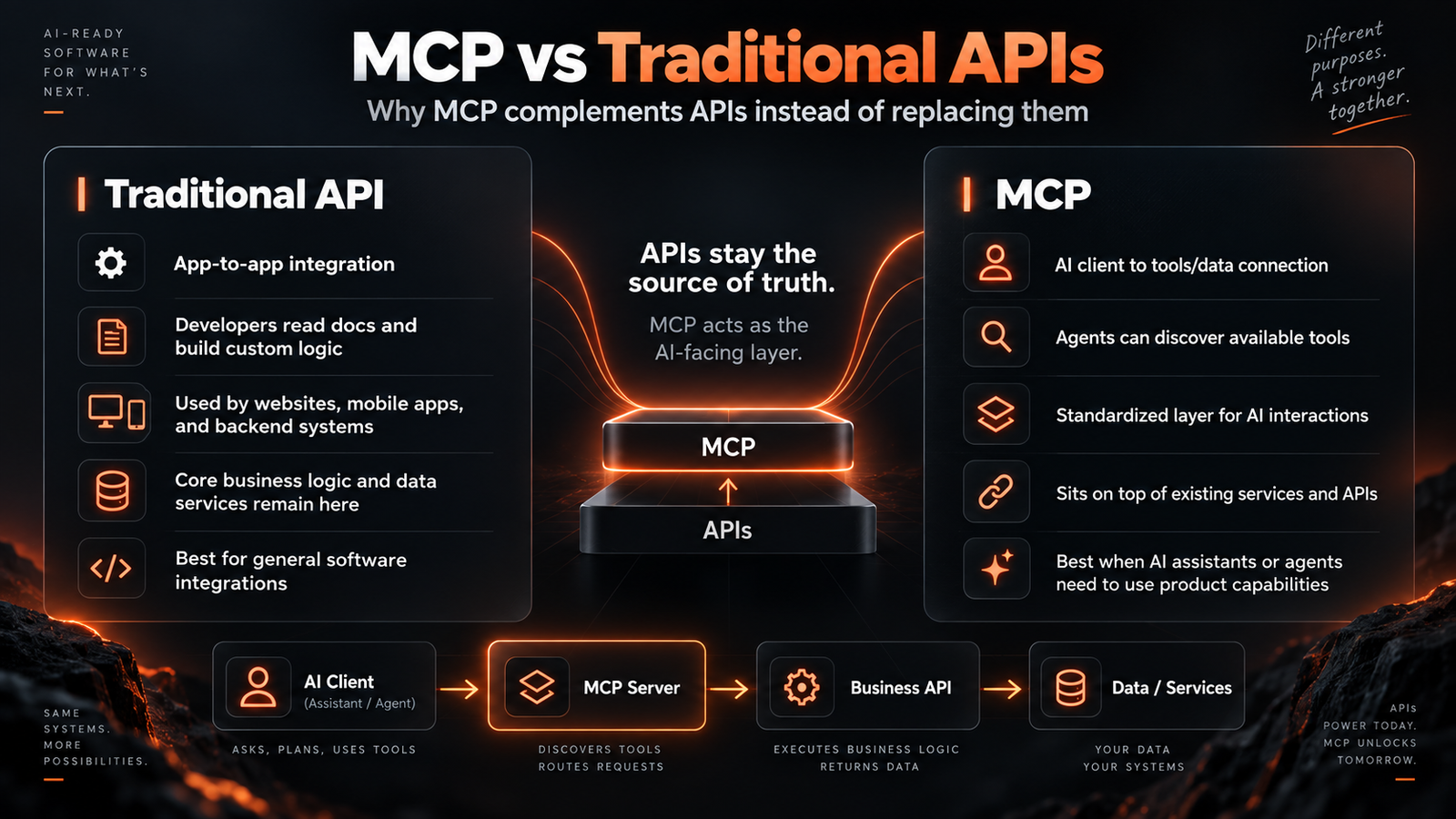
The MCP server should usually remain thin. It should describe tools clearly, validate inputs, enforce permissions, call existing business services and return structured results.
Your real business logic should stay in the same trusted service layer used by your website, mobile app and other integrations. This avoids creating two different versions of your product logic.
How to Decide What Tools to Expose
Start with a small set of high-value, low-risk actions.
| Good First MCP Tool | Higher-Risk Tool |
|---|---|
| Search customer records | Delete customer account |
| Read invoice status | Issue refund |
| List available products | Change pricing |
| Create draft support ticket | Close incident without review |
| Generate report | Modify financial records |
Will Customers Start Expecting MCP Support?
Not every end user will know the term MCP. They may simply ask whether your product “works with Claude,” “connects to ChatGPT,” or “can be used by our AI agent.”
If MCP continues consolidating as a shared protocol, the business value is that your team may not need to build a separate custom connector for every new AI client.
The latest MCP roadmap shows the project focusing on agent messaging, HTTP-native transport, agent identity, enterprise security and improved SDK experience—signs that the protocol is moving deeper into production infrastructure rather than remaining only a developer experiment.
Official roadmap covering agent identity, enterprise-ready security, messaging primitives and transport hardening.
A Practical MCP Readiness Checklist
- Do customers have a real reason to use an AI agent with your product?
- Do you already have stable APIs or service-layer methods?
- Can every action be tied to a real authenticated identity?
- Can you enforce least privilege per user and organization?
- Can high-risk actions require confirmation?
- Can every tool call be logged and audited?
- Can the integration fail safely?
- Can you version and maintain the MCP surface over time?
If most answers are yes: an MCP server may be a logical next integration layer.
If several answers are no: fix your underlying API, identity and permission architecture before adding an agent-facing protocol.
How Designing & Marketing IT Solutions Can Help
For businesses building SaaS products, internal platforms, web applications or custom software, the question is not simply “Can we build an MCP server?” The more important question is whether MCP creates a useful, secure and maintainable product experience.
MCP Readiness Review
Identify which workflows are actually valuable for AI-agent access.
API & Architecture Review
Check whether the current backend is ready to support an agent-facing layer.
Custom MCP Development
Build MCP tools around existing services and business logic.
Authentication & Permissions
Design user, organization and role-aware access controls.
Security & Validation
Add input validation, audit logs, confirmation gates and least-privilege tools.
Long-Term Integration Support
Maintain the integration as the protocol and your product evolve.
Should Your Software Be Ready for AI Agents?
If customers are beginning to ask for ChatGPT, Claude or AI-agent integrations, we can help evaluate whether MCP is the right architecture—and build it without bypassing the security and business logic your product already depends on.
Discuss Your MCP IntegrationFrequently Asked Questions
What is Model Context Protocol (MCP)?
MCP is an open protocol that lets AI applications connect to external tools and data sources through a standardized client-server interface.
Does MCP replace REST APIs?
No. Existing REST, GraphQL or other APIs can remain the core integration and business-logic layer. An MCP server can expose selected capabilities from those systems to compatible AI clients.
What is an MCP server?
An MCP server exposes tools, resources or other capabilities that an MCP-compatible AI client can discover and use. The server can connect those capabilities to your existing APIs, databases and services.
Does every SaaS application need an MCP server?
No. MCP is most useful when customers have a meaningful AI-agent workflow involving your product. If there is no valuable use case, adding MCP only increases complexity.
Is MCP secure?
MCP can be deployed securely, but security depends heavily on authentication, authorization, tool design, input validation and infrastructure. Exposing overly powerful tools or excessive permissions can create serious risk.
What is the difference between MCP and function calling?
Function calling usually defines tools within a specific model or application integration. MCP provides a broader standardized protocol for exposing capabilities so different compatible AI clients can connect through the same interface.
Can MCP connect an AI agent to a database?
Yes, but direct unrestricted database access is usually not the safest design. A production MCP server should expose controlled operations and apply the same authorization rules as the rest of the application.
Can MCP be used for internal company software?
Yes. Internal use cases can be especially valuable because MCP can connect agents to approved business tools, knowledge systems, reporting services and operational workflows while preserving access controls.
How do I know whether my software is MCP-ready?
A product is a stronger MCP candidate when it has stable APIs, clear business workflows, robust authentication and authorization, auditable actions and a real customer need for AI-agent access.