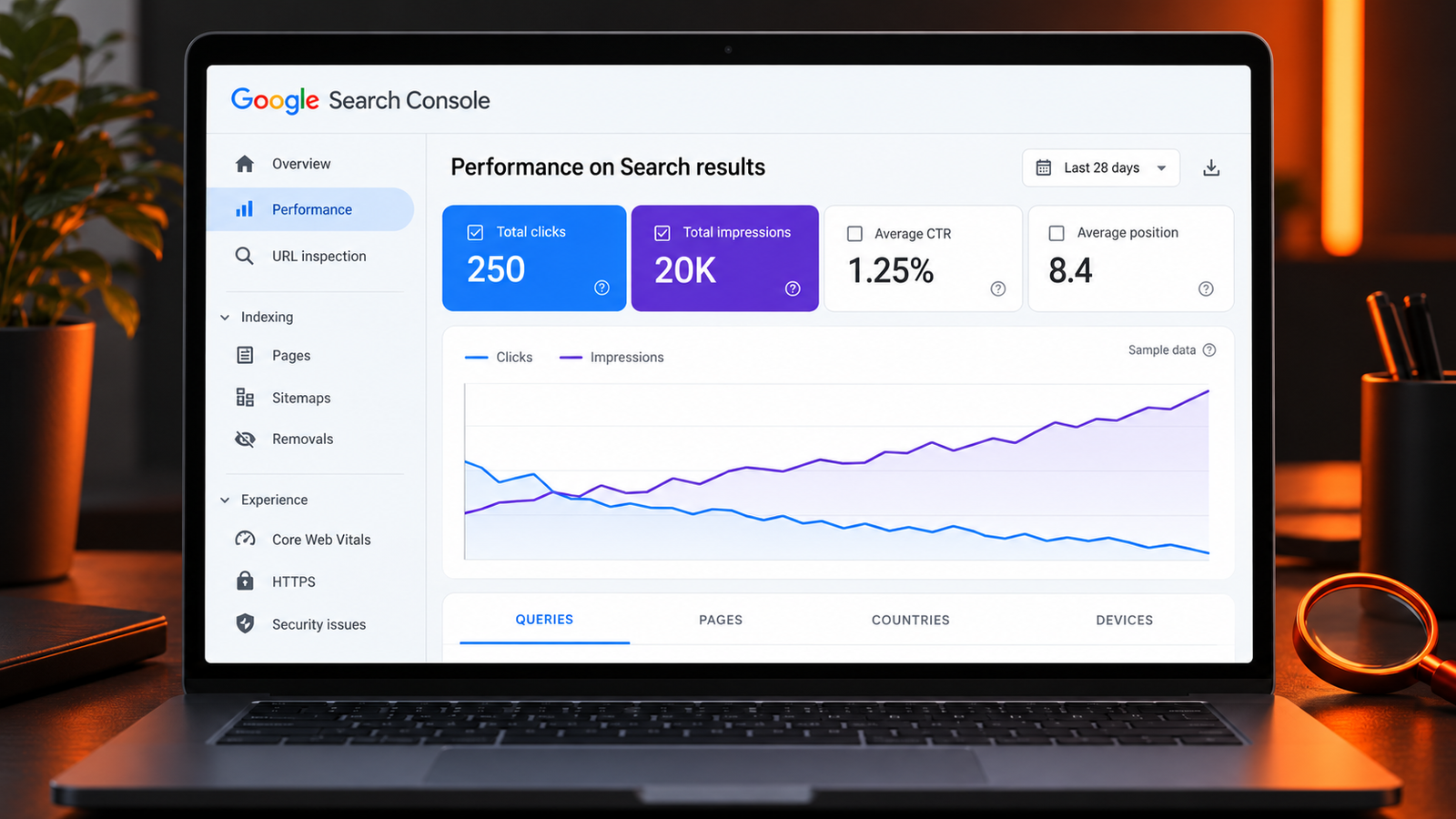
Your Search Console chart shows more impressions, but fewer people are visiting your website. It can look as though Google is showing your pages to more people while sending you less traffic.
Before rewriting every title or blaming AI Overviews, find out what changed. Your website may be appearing for new queries at lower positions, losing clicks on a valuable page, or attracting an audience that does not match your offer. Each situation needs a different fix.
Why do impressions increase while clicks decrease?
High impressions and low clicks usually mean your visibility is growing faster than your ability to attract relevant visits. Common explanations include lower rankings for new queries, changes in the queries generating impressions, weak titles or snippets, mismatched search intent, and search results that answer the question before someone visits a website.
The first step is to compare the same pages and queries over time. A site-wide CTR drop does not prove that all your pages are performing worse.
Understand the numbers before changing anything
An impression records an eligible appearance of your website in Google results. The exact counting rules depend on the result type. A click records a qualifying click through to your site. Click-through rate, or CTR, is calculated as:
CTR = clicks ÷ impressions × 100
Consider this hypothetical example:
| Period | Impressions | Clicks | CTR |
|---|---|---|---|
| Previous 28 days | 10,000 | 300 | 3% |
| Latest 28 days | 20,000 | 250 | 1.25% |
Impressions doubled, but clicks fell by 50. To understand why, investigate which pages and queries produced the additional impressions and which lost clicks.
There is no universal CTR target for every website. Position, search intent, device, brand familiarity, and the layout of the results all influence the opportunity to earn a click.
Six reasons you may have high impressions but low clicks
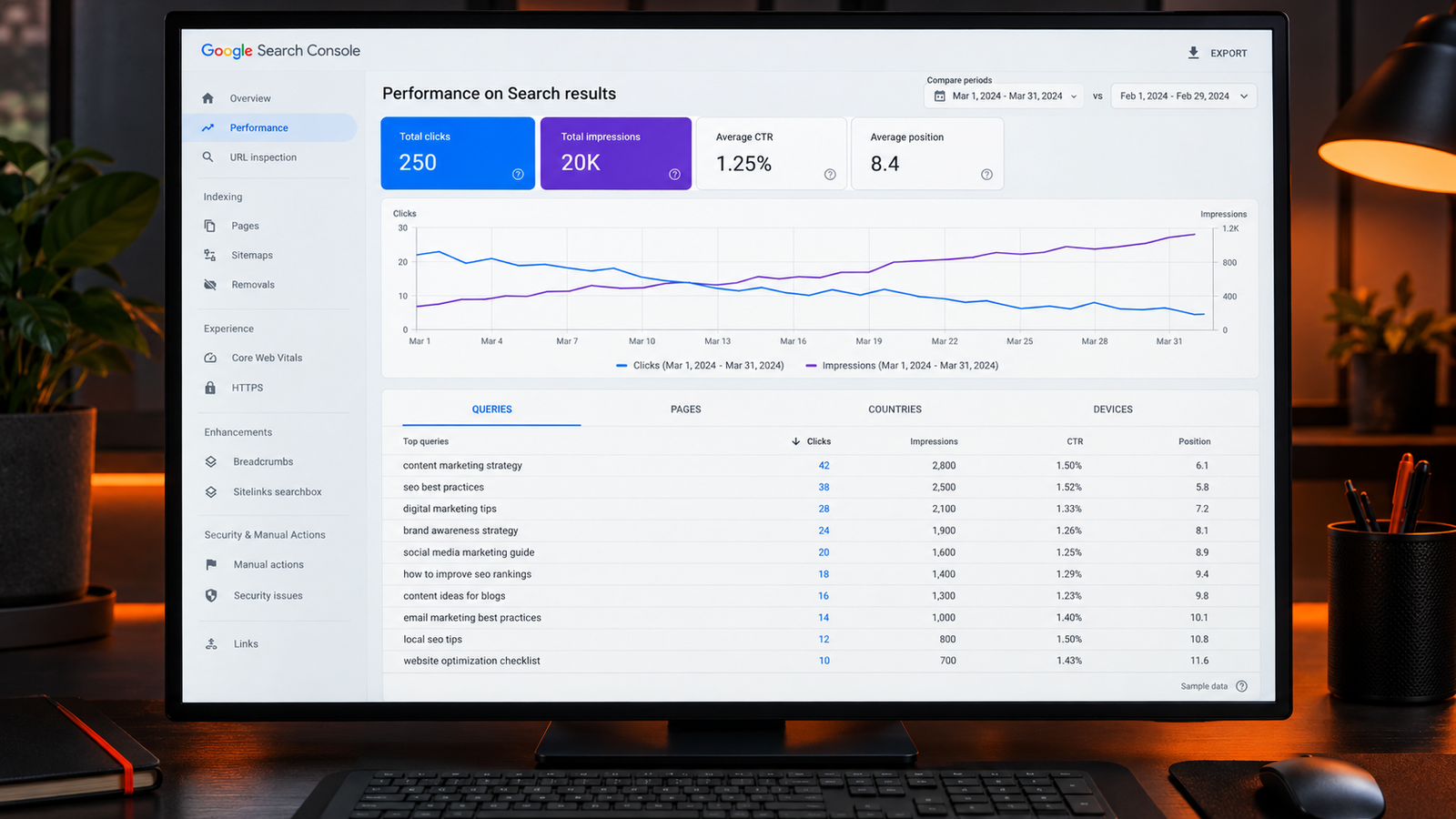
1. You are appearing for more queries at lower positions
A page can gain visibility for additional searches without reaching a competitive position for those searches. Those impressions may bring few clicks and lower the overall CTR, even while some established queries perform well.
What to fix: Filter the report to a specific page, then compare its queries across both periods. If the additional impressions come from relevant terms at weaker positions, strengthen the page's coverage and relevant internal links. Changing the title alone may not resolve a ranking problem.
2. Your query mix has changed
An increase in broad informational impressions can change your totals significantly. For example, an agency may gain impressions for “what is digital marketing” while losing clicks for “digital marketing agency in Mohali.” These searches have different audiences and business value.
What to fix: Separate branded searches, service queries, local searches, and informational questions. Prioritize the queries that can bring suitable customers rather than treating every impression equally.
3. Your title does not explain why the page is useful
A vague title can make a relevant page easy to skip. “Our Complete Website Guide” says less than “Website Redesign Checklist: What to Check Before You Rebuild.” The second title names a task and gives the reader a reason to investigate.
What to fix: Describe the page's actual purpose, answer the main search intent, and make any benefit specific. Avoid unsupported promises and adding a year unless freshness matters and the content is maintained.
4. The page does not match the searcher's intent
Someone searching for pricing may want figures, inclusions, and cost drivers. A general explanation of the service may not help them decide. Likewise, a buyer comparing two platforms needs differences and trade-offs rather than two separate definitions.
What to fix: Review the important queries associated with the page. Look at the current results and identify the format people are being offered: a product category, comparison, tutorial, local service page, or pricing guide. Improve the page around the relevant task.
5. The search results offer answers and alternatives before your link
AI answers, featured snippets, local results, shopping results, videos, and ads can affect what a searcher sees and chooses. However, a falling CTR chart alone cannot show which feature caused the change. Search layouts also vary by query, time, location, and device.
What to fix: Inspect representative searches for the affected queries and record the visible features. Add information that gives people a reason to visit: original examples, useful templates, detailed comparisons, calculators, or evidence they cannot get from a short summary. Choose additions that genuinely help your audience.
6. A small number of pages are hiding behind healthy totals
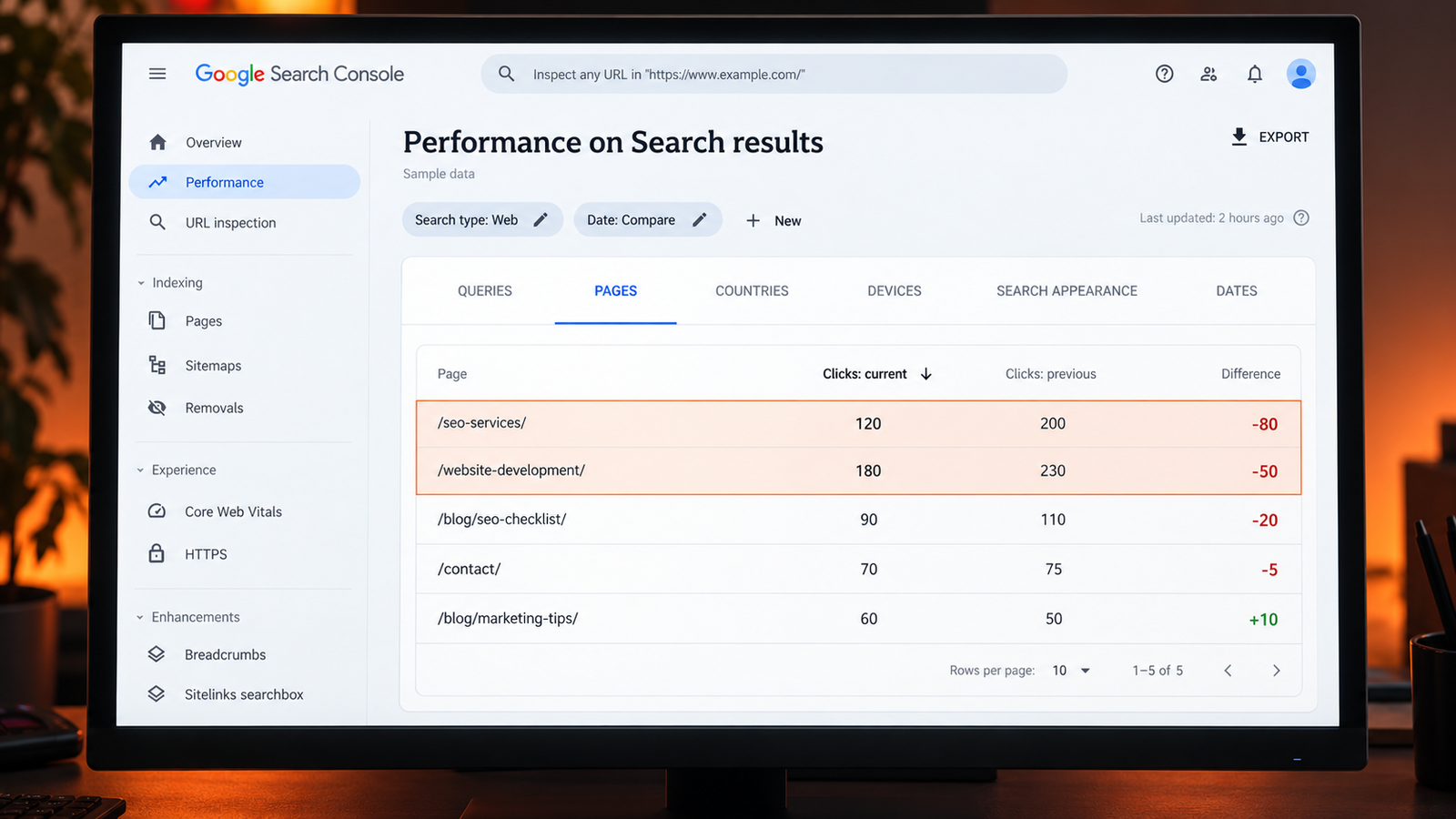
New articles may gain impressions while an established service page loses traffic. The site-wide graph can make this look like a general CTR issue, when the commercially important problem is concentrated in a few URLs.
What to fix: Compare pages by clicks lost. Investigate your biggest losses before making changes across the entire website.
How to investigate the problem in Search Console
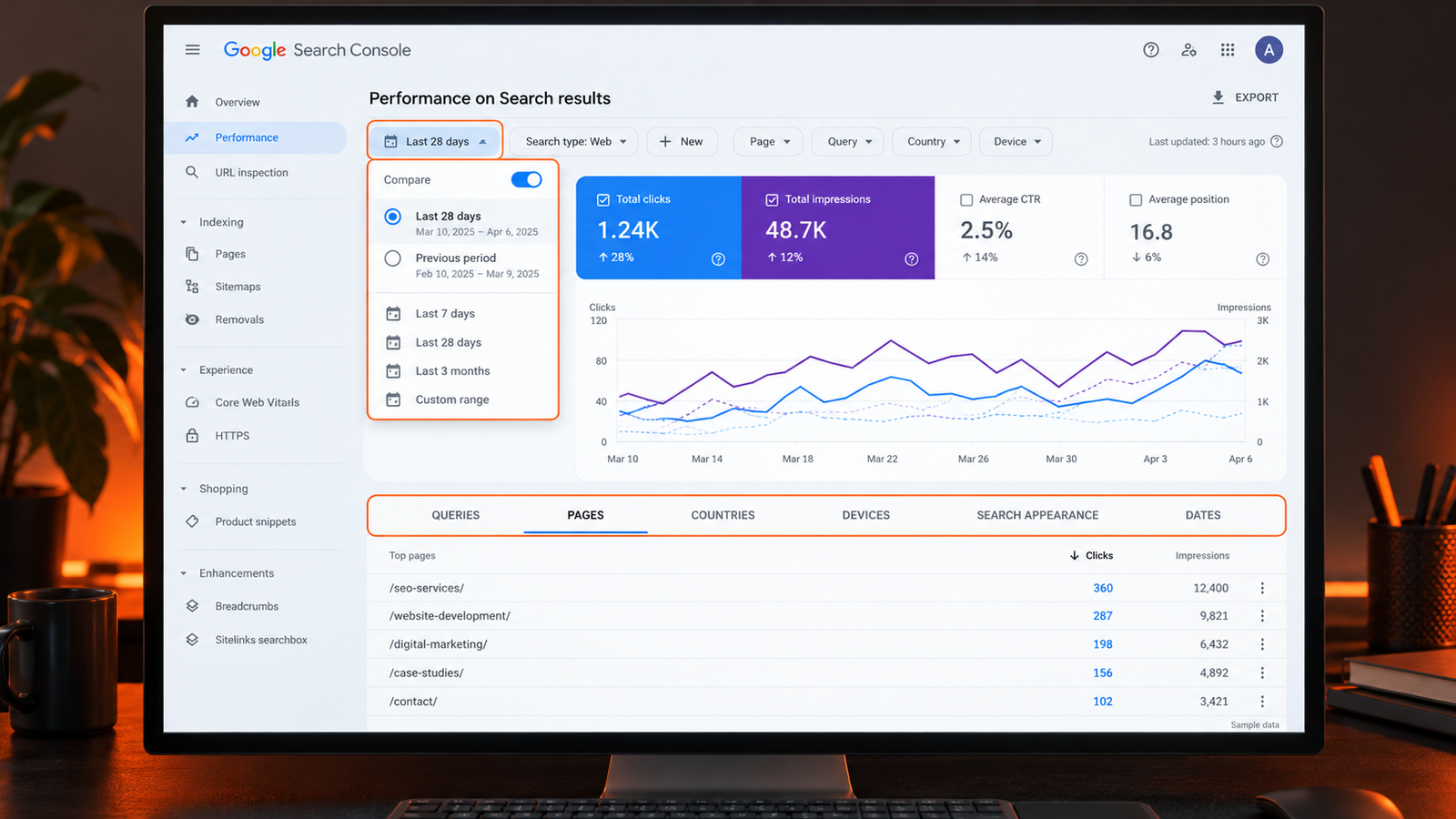
- Choose comparable periods. Start with the latest complete 28 days versus the previous 28 days. Use a year-over-year comparison when seasonality matters and data is available.
- Keep the search type consistent. Analyze Web, Image, Video, and News performance separately where relevant.
- Enable all four metrics. Review clicks, impressions, CTR, and average position together.
- Find the pages losing clicks. In the Pages view, compare performance and identify the URLs responsible for the decline.
- Inspect each page's queries. Apply a page filter and examine the Queries view to see which searches changed.
- Check country and device. A rise in impressions from a different market or device mix may explain part of the change.
- Review the actual results. Check a small set of important searches, keeping location and device in mind. Treat a manual search as a sample, not an exact reproduction of every user's experience.
Search Console averages summarize many searches. Avoid using a site-wide average position as though it were a fixed ranking for one keyword. Query tables can also omit anonymized searches, so filtered totals may not reconcile perfectly with headline totals.
Which pages should you fix first?
| What you find | What to prioritize |
|---|---|
| Relevant query, competitive position, falling CTR | Review the displayed title, snippet, competing results, and search intent |
| Relevant query, persistently weak position | Improve page usefulness, relevance, internal linking, and technical accessibility |
| More impressions from unsuitable searches | Clarify page targeting and its fit with your offer |
| One valuable URL loses most of the clicks | Investigate that URL before changing unrelated pages |
| Visits remain steady but enquiries fall | Check conversion tracking, forms, calls to action, and the visitor journey |
A page that already attracts impressions for valuable searches is a sensible candidate for review. Prioritize it using business relevance and evidence, not a promise of an immediate CTR increase.
How to measure whether your changes helped
Record the page, queries, date, and changes made. After Google has had time to process the update and enough impressions have accumulated, compare the same query groups, country, and device where possible.
Review clicks and CTR alongside position and impressions. Then check qualified enquiries, purchases, or other meaningful actions in your analytics. More clicks are useful when they bring the right audience.
Avoid changing every title at once. A smaller set of documented changes makes the results easier to interpret, although seasonality and other search changes can still affect the comparison.
Frequently asked questions
Are high impressions with no clicks bad for SEO?
They signal an opportunity to investigate. A new page appearing at lower positions can receive impressions before it earns regular clicks. Persistent low clicks for important searches deserve closer review, but impressions alone do not establish a penalty or problem.
What is a good organic CTR?
There is no single percentage that fits all queries. Compare similar searches at similar positions and evaluate your own trend alongside search intent and business value.
Can changing my meta description increase clicks?
A more relevant description may help when it is displayed, but it does not guarantee additional clicks. The title, ranking, competing results, and the page's fit with the query also matter.
Does a CTR drop prove that AI Overviews reduced my traffic?
No. It can also result from ranking changes, query mix, competition, seasonality, or other search features. Investigate the affected pages and queries before assigning a cause.
Turn visibility into relevant visits
When impressions increase but clicks fall, locate the change before choosing the fix. Identify the pages losing valuable traffic, separate ranking problems from presentation problems, and align each page with what its audience needs.
If you need help interpreting your Search Console data, explore Designing & Marketing's SEO services or contact our team to discuss your website's performance.